 AIVideoFree
AI Bikini Generator & Swimwear Try-On
See a swimsuit on your own photo before you buy it, or put your whole swimwear range on one model shoot. Same person, same pose, same background — only the garment changes.
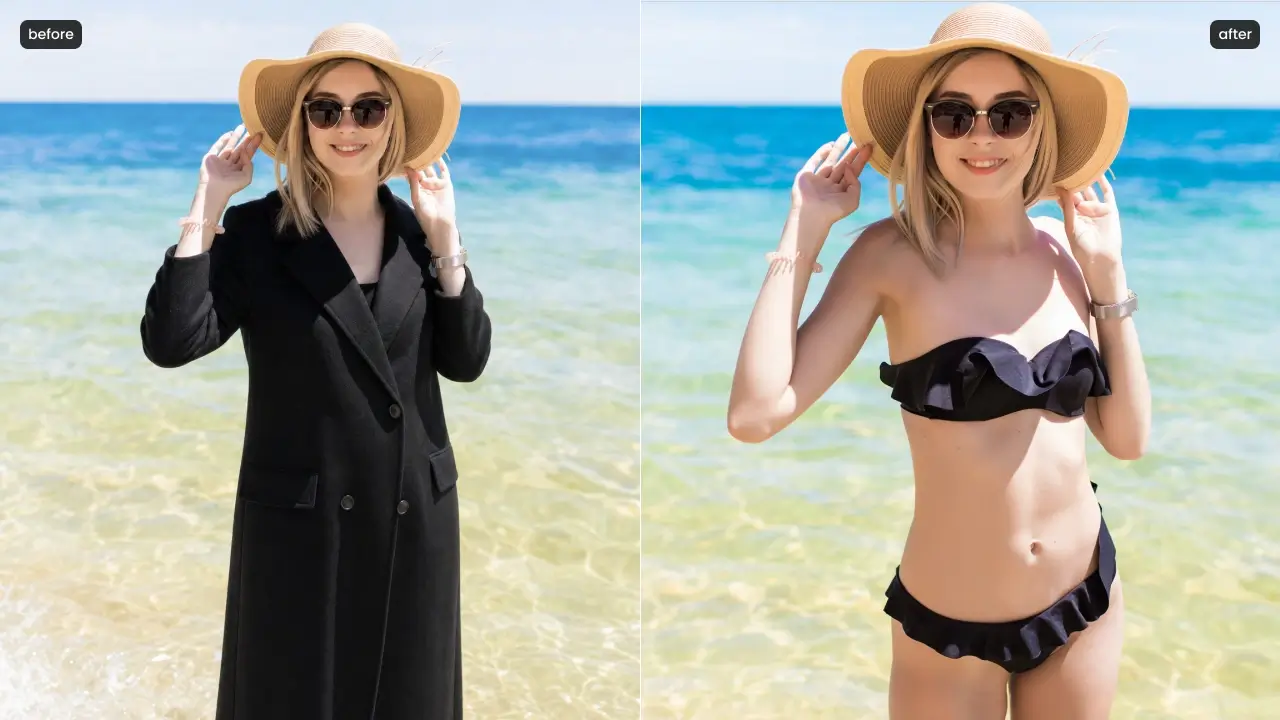
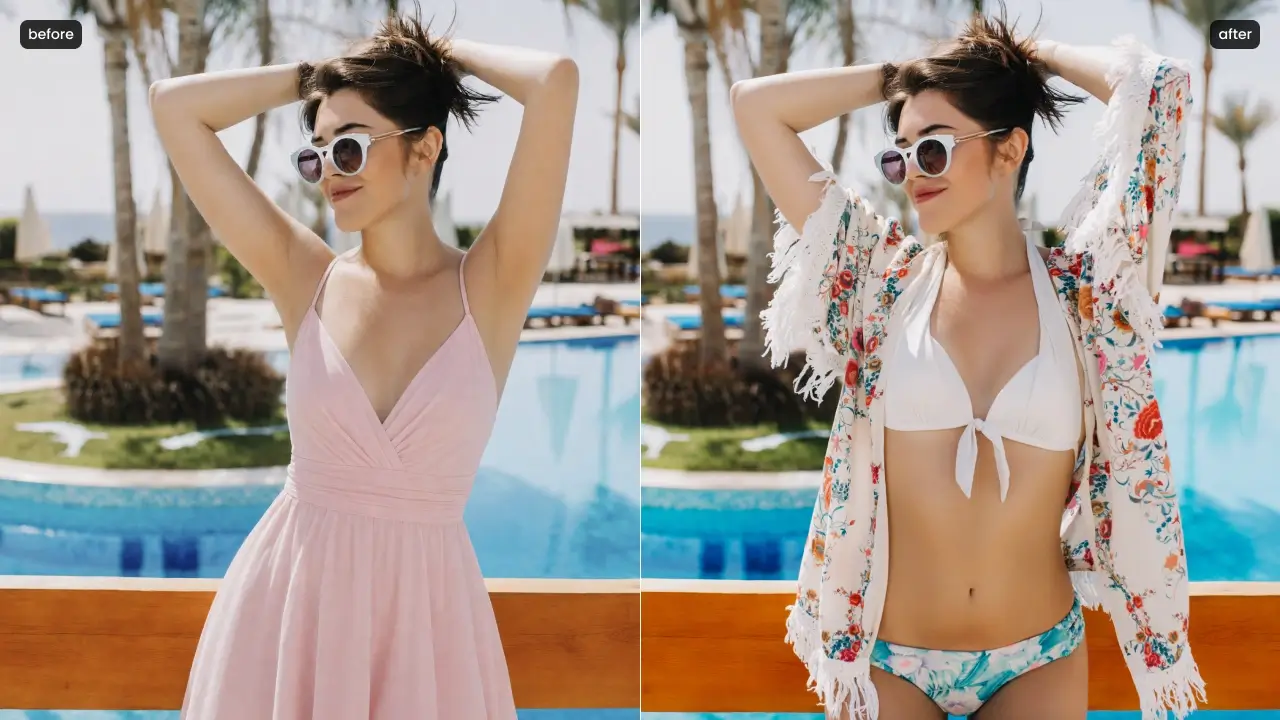
Input
JPG · PNG · WebP · HEIC, 20 MB
Modes
Describe · upload garment · recolour
Preserved
Face · pose · body · background
Typical time
10–25 seconds
Output
Up to 2K on credits
Free tier
3 edits daily, no account
Scope
Swimwear try-on · clothed-to-clothed only
Our one-line verdict: the swimwear version of a fitting room and a product shoot. It shows how a suit looks on a real photo — which is useful commerce, and the only thing this page is for.
Swimwear is the hardest category in online retail: return rates are brutal, customers can't tell how a cut will actually sit, and a brand with forty products has to choose between forty shoots and forty flat-lays nobody wants to look at. This does both halves of that problem. On your own photo, it shows how a cut, colour and fabric read on you before you spend money. On a model shoot you hold a release for, it puts your whole range on one set of photographs, including colourways that so far only exist on a spec sheet. One boundary stated plainly rather than buried: this is swimwear-to-swimwear and clothed-to-clothed only. It changes garments on people who chose to be photographed in them; it does not undress anyone, and it isn't a tool for editing other people's photos.
How to try on swimwear in 3 steps
Upload the photo
Your own photo, or a model shot you have a release for. Standing poses with arms clear of the torso give the cleanest results, because the garment region is easier to read.
Describe the suit, or upload it
Either write it — 'high-waisted two-piece, terracotta ribbed fabric, halter neckline' — or upload the actual product image to fit. Name the fabric first, then the cut, then the colour.
Generate, compare, export
Ten to twenty-five seconds. Check the edges where fabric meets skin and the straps — that's where drift shows first — then download.
Who uses this
One shoot, the whole range
Photograph a model once, then show every product and every colourway on them — including the ones that only exist as a fabric swatch and a spec sheet. This is the workflow that made virtual try-on a category rather than a gimmick.
Deciding before ordering three sizes
Swimwear has some of the worst return rates in retail, mostly because a flat-lay tells you nothing about how a cut sits. Seeing it on your own photo is a better signal than a size chart and a hope.
Listings that look like a brand
A one-person label with no studio budget can still show a coherent range on a consistent model. Style guidance for clients works the same way — they see themselves, not a stranger.
What it does well — and what it won't do
The right column is half technical limits and half rules we've chosen. Knowing the failure modes before you upload saves more time than any guide.
What it does well
• Everything but the garment stays put.
Face, pose, hands, body proportions, background and light are preserved — only the swimwear region is regenerated. That's what makes the output usable on a product page instead of looking like a different photo of a different person.
• Real products, not just descriptions.
Upload the actual garment image and it's fitted to the pose, following the body and the drape. This is the difference between a try-on and a costume generator.
• Fabric behaves like fabric.
Ribbed knits, matte lycra, crinkle, terry and mesh all read differently. Naming the material does more work than naming the colour — it's the single highest-value word in the prompt.
• Colourways without a reshoot.
Same cut, eight colours, one afternoon. The clearest money-saver here and the reason swimwear brands adopted this workflow first.
What it won't do
• Prints, logos and straps.
Precise print placement, brand logos and complex strap arrangements drift. Simple silhouettes and solid or lightly patterned suits hold up best — put critical logos on in your design tool.
• Fit is plausible, not measured.
It shows how a suit looks, not how it will fit your body. Useful for style decisions; it can't replace a size chart, and it shouldn't be presented to customers as if it could.
• Your own photo, or a model you have a release for.
Not a stranger's photo, not an image from social media, not a celebrity. This is a commerce tool and the rights position matters as much as the output.
• Clothed-to-clothed only.
No removal, no revealing edits, no 'undress' prompts in any phrasing. There's no premium tier where this changes — the capability isn't offered here at all.
Your photos, and our rules
This section is the product, not the fine print. A tool that animates people's faces should tell you plainly what it keeps and what it refuses.
What happens to your uploads
• Deleted within 24 hours.
Your photo, any garment image and the generated result are removed from storage automatically.
• Not used for training.
Uploads never enter a training set — ours or a partner's.
• Nothing published.
No gallery, no featured results, nothing built out of customers' or models' photographs.
• Body data isn't kept.
Pose and body-shape information exists only for the length of the job and is discarded with it.
What we won't process
• Removal of clothing, in any phrasing.
Swimwear-to-swimwear and clothed-to-clothed only. 'Undress', 'remove', 'see-through', 'topless' and every euphemism for the same request are refused, on every tier.
• Other people's photos.
Your own photo, or a model shot you hold a release for. Someone from social media, a friend who hasn't agreed, a stranger — no. This is the rule that separates a commerce tool from a harassment tool.
• Anyone under 18.
No edits to photos of minors, in any context, including ones that look entirely innocuous. Refused outright.
• Sexualised or degrading edits.
No intimate, explicit or humiliating transformations of a real person. Reported misuse ends the account.
Swimwear, other clothing, or a fresh product visual?
Questions, answered straight
Two jobs. On your own photo, it's a fitting room: describe a swimsuit or upload the actual product, and it shows how that cut, colour and fabric read on you, keeping your pose, body proportions and background untouched. On a model photo you hold a release for, it's a product-visual tool: put a whole swimwear range and its colourways on one shoot instead of booking forty.
Other tools on this site
The same mechanic for every other kind of outfit.
Backgrounds, props and restyling across ten models.
Turn the finished listing photo into a short clip.