 AIVideoFree
AI Clothes Changer & Virtual Try-On
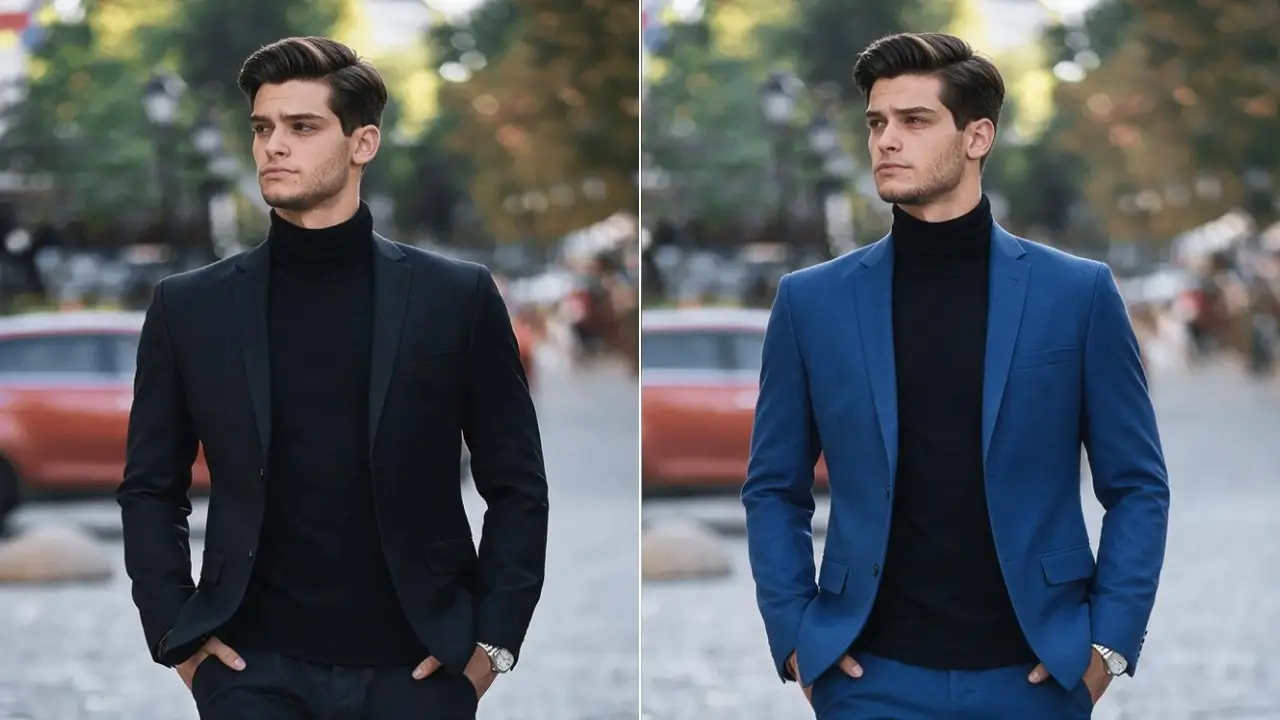
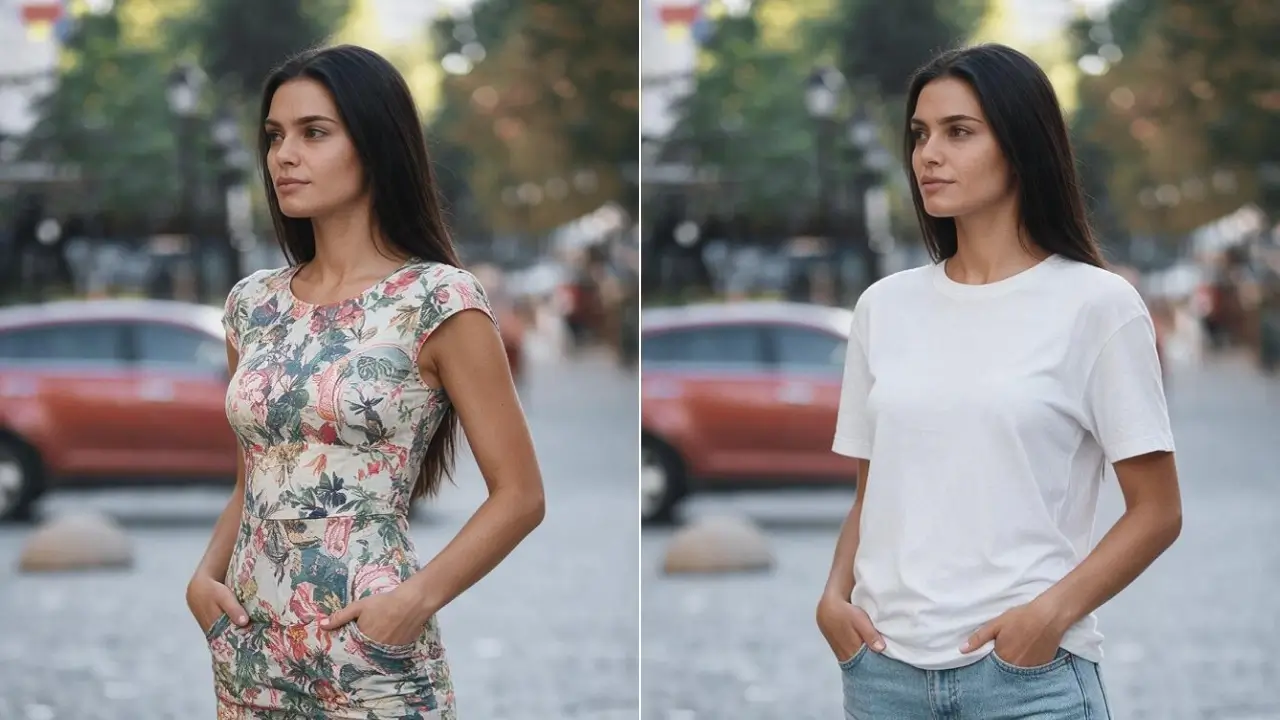
Describe the outfit or upload the garment, and it replaces what the person is wearing — same pose, same body, same background. Clothed-to-clothed only, by design.
Input formats
JPG · PNG · WebP · HEIC
Max file size
20 MB per image
Modes
Describe · upload garment · recolor
Preserved
Face · pose · body · background
Typical time
10–25 seconds
Free tier
3 edits daily, no account
Scope
Clothed-to-clothed only
Our one-line verdict: the try-on that keeps the photo. Pose, proportions and background stay put — only the garment changes, which is what makes it usable for a product page instead of just a novelty.
Changing clothes in a photo is one job with two very different customers: someone deciding whether a jacket suits them, and a shop that needs one model photographed once and shown in forty products. Both need the same thing — the person, the pose, the body proportions and the background preserved exactly, with only the garment replaced. You can describe the new outfit in words, upload the actual garment for a true try-on, or just change a color or fabric. One boundary that's worth stating plainly rather than burying: this tool does clothed-to-clothed changes only. It won't remove clothing, and prompts pointing that way are refused.
How to change clothes in a photo, in 3 steps
Upload the photo
A clear photo of the person, full or half body, with the current outfit visible. Standing poses with arms clear of the torso give the cleanest results — the garment region is easier to read.
Describe the outfit or upload the garment
Either write it ('a charcoal linen suit, open collar, no tie') or upload the actual product image to try on. Naming the fabric is the single highest-value word in the prompt.

Generate, compare, download
10–25 seconds later you get the edit with pose, background and face preserved. Iterate on wording or colorways, then download — HD on credits.
What it does well — and what it won't do
Both halves matter here. The right column is partly technical limits and partly rules we've chosen; we've kept them together so you know before you upload.
What it does well
• Everything else stays put.
Face, pose, hands, body proportions, background and lighting are preserved — only the garment region is regenerated. That's the difference between an edit and a new photo of a stranger.
• Real garments, not just descriptions.
Upload the actual product image and it's fitted to the person, following the pose and draping over the body. This is what makes it a try-on rather than a costume generator.
• Fabric behaviour.
Linen creases, knit stretches, leather catches light, silk falls. Naming the material in your prompt does more work than naming the color.
• Recolor and refabric in place.
Same cut, different colorway or material — the fastest way to show a product's variants without reshooting each one.
What it won't do
• Clothed-to-clothed only.
No removal of clothing, no revealing edits, no 'undress' prompts in any phrasing. This is a hard boundary, not a setting, and requests aiming at it are refused.
• Complex layers and prints.
Multi-layer outfits, sheer fabrics and precise logo or pattern placement can drift. Simple silhouettes and solid or simple-patterned garments are where the fidelity is highest.
• Fit is plausible, not measured.
It shows how a garment looks, not how it will fit your body. Useful for style decisions; not a substitute for sizing information.
• Other people's photos.
You need the right to use the photo — your own picture, your model with a release, your product shot. Someone else's photo isn't yours to edit.
What people actually use it for
One shoot, the whole catalog
Photograph the model once, then show every product on them — including colorways that only exist as a spec sheet. The reason virtual try-on became a category rather than a gimmick.
Deciding before buying
Seeing whether a cut and color work on you before committing, instead of buying three and returning two. Style guidance, not sizing advice.
Look boards that use real people
Building outfit concepts on an actual client photo rather than a mood board of strangers — the client sees themselves, which is the whole point of a consultation.
Your photos, and our rules
This section is the product, not the fine print. If a tool in this category won't tell you plainly what it keeps and what it refuses, that silence is the answer.
What happens to your uploads
• Deleted within 24 hours.
Your photo, any garment image and the result are removed from storage automatically.
• Not used for training.
Uploads never enter a training set — ours or a partner's.
• No public gallery.
Nothing you generate is published or shown to other users.
• Body data isn't kept.
Pose and body-shape information exists only for the duration of the job and is discarded with it.
What we won't process
• Removal of clothing, in any phrasing.
Clothed-to-clothed only. 'Undress', 'remove', 'see-through', 'lingerie only' and every euphemism for the same request are refused. There is no premium tier where this changes.
• Anyone under 18.
No edits to photos of minors, in any context, including ones that look innocuous. Refused outright.
• Photos of people who didn't agree.
Your own photo, or one you have permission and rights to use. Editing a stranger's photo — from social media, from anywhere — isn't a use case we support.
• Sexualized or harassing edits.
No intimate or degrading transformations of a real person, and nothing built to humiliate someone. Reported misuse ends the account.
Clothes changer, face swap, or a fresh generation?
Questions, answered straight
It reads the photo — the person, their pose and the garment region — then regenerates only the clothing while keeping face, body proportions, background and lighting untouched. You can steer it by describing the outfit, uploading the actual garment for a try-on, or asking for a different color or fabric of the same piece.